How to Download from BMovies?

BMovies is a well-known free streaming website that offers a large collection of movies and TV shows across different genres. From newly released films to classic titles and popular series, BMovies attracts millions of users who want instant access without subscriptions. However, like most free streaming platforms, BMovies does not provide a built-in download option. This leaves many users searching for reliable ways to save videos for offline viewing, archiving, or personal collections.
In this guide, we’ll explain what BMovies is, explore popular BMovies alternatives, and walk through the most effective ways to download content from BMovies.
1. What Is BMovies?
BMovies is an online streaming website that allows users to watch movies and TV shows for free. The platform is known for its clean interface, fast streaming speeds, and extensive content library that includes Hollywood movies, international films, and trending TV series.
Key characteristics of BMovies include:
- Free access without account registration
- Large library of movies and TV shows
- Multiple streaming servers per video
- HD playback options on many titles
- Frequent updates with new content
Despite these advantages, BMovies is strictly a streaming-only platform. There is no official way to download videos, which is why third-party tools are required for offline access.
2. BMovies Alternatives
If BMovies is unavailable, slow, or blocked in your region, several alternatives offer similar streaming experiences. Some popular BMovies alternatives include:
- FMovies – A large movie library with HD streaming and multiple servers
- 123Movies – Known for fast updates and popular releases
- SolarMovie – Offers well-organized movie categories and subtitles
- LookMovie – Minimal ads and high-quality streaming
- YesMovies – Focuses on both movies and TV series with genre filtering
While these platforms vary in design and content availability, they share one common limitation: none provide official download options, making third-party download methods necessary across all of them.
3. How to Download from BMovies?
Since BMovies does not allow direct downloads, users rely on alternative methods. Below are the most practical and commonly used options.
3.1 Record BMovies with OBS
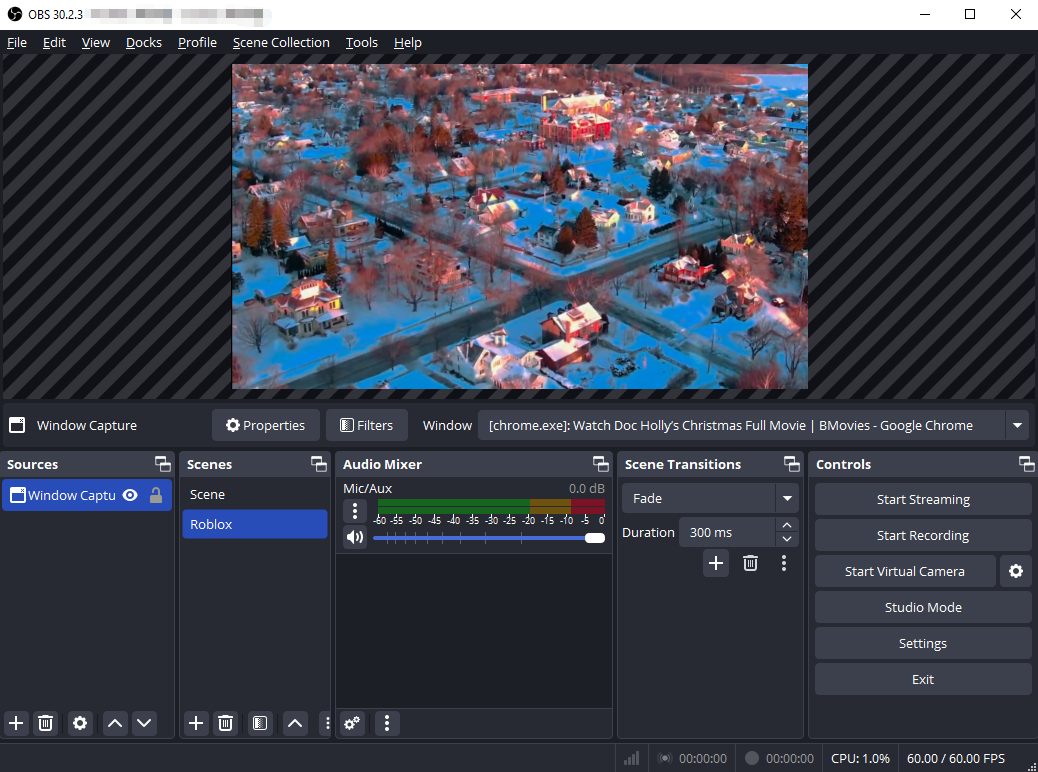
Screen recording is one of the most universal methods to save BMovies content. OBS Studio is a free, open-source screen recorder that can capture exactly what’s playing on your screen, including system audio.
Steps to Record BMovies with OBS:
- Download and install OBS Studio from the official website, then open OBS and configure basic settings (resolution, audio input, output format)
- Add a “Display Capture” or “Window Capture” source
- Open the BMovies video you want to save and switch to full-screen mode
- Click “Start Recording” in OBS and play the movie or episode; Click “Stop Recording” when finished.
Pros:
- Completely free and open-source
- Works with all streaming websites
- High-quality recording options
Cons:
- Must record in real time
- Large file sizes
- Manual setup required
3.2 Download BMovies with Browser Extensions
Browser extensions provide a faster and more convenient alternative for downloading individual videos. These tools detect media streams directly in your browser and generate downloadable links.
Common extensions used for BMovies include:
- Video DownloadHelper
- Flash Video Downloader
- Video Downloader PLUS
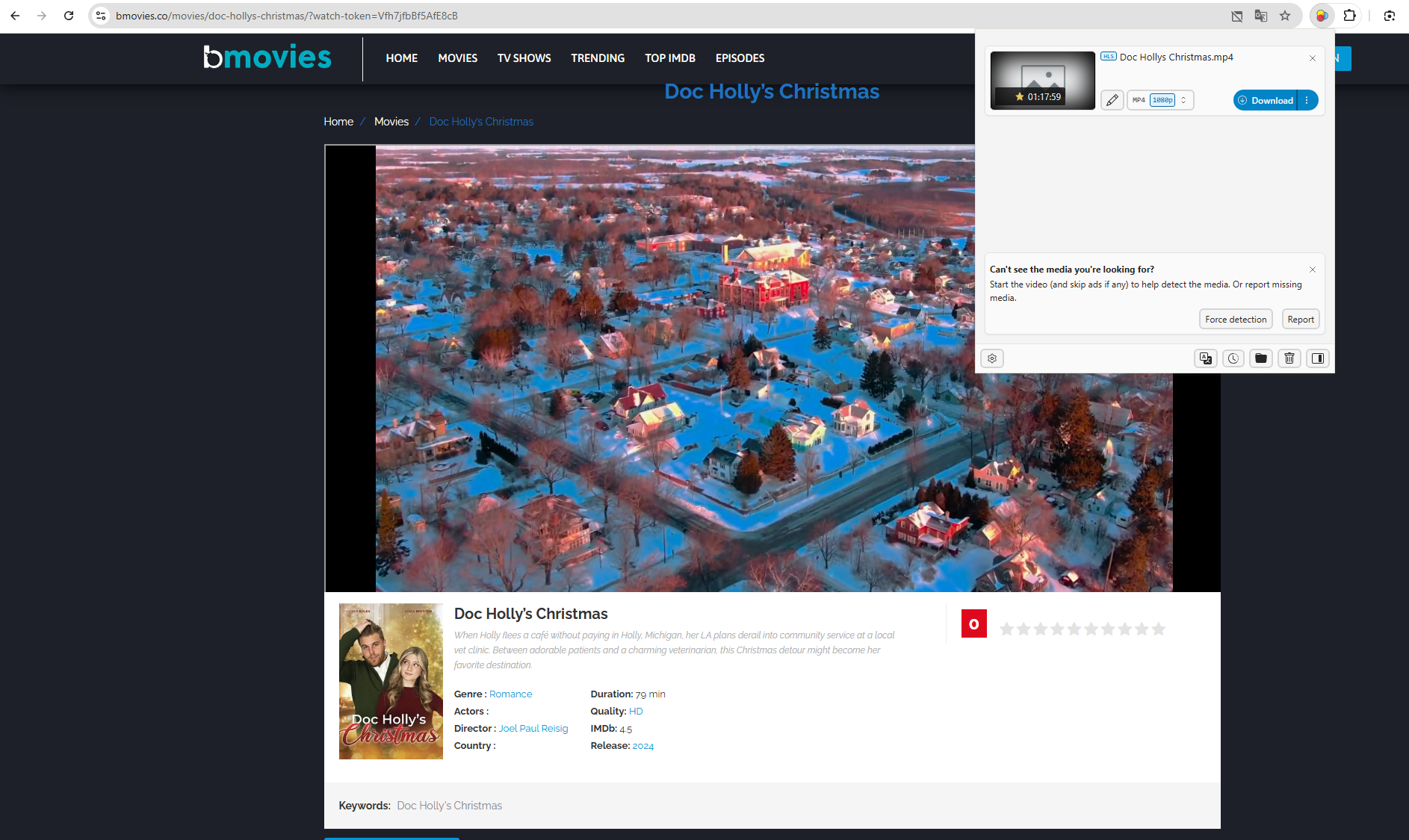
Steps to Download Using Extensions:
- Install a trusted video downloader extension {such as Video DownloadHelper) from your browser’s extension store.
- Open the BMovies video you want to download, then play the video to allow the extension to detect the stream and click the extension icon in the toolbar.
- Select the available resolution and format, then download and save the file.
Pros:
- Faster than screen recording
- No need for separate software
- Easy to use
Cons:
- Some servers block extensions
- Usually limited to single downloads
- Ads or watermark risks with free versions
3.3 Advanced Bulk Download BMovies with Meget
For users who want to download multiple movies, entire TV series, or large collections, Meget is the most powerful and efficient solution. Unlike screen recorders or browser extensions, Meget is designed specifically for high-quality, bulk video downloading.
Main Features of Meget:
- Support many video streaming sites, including BMovies.
- Download multiple BMovies videos simultaneously.
- Supports 720p, 1080p, and higher resolutions.
- Export videos in MP4, MKV, and other popular formats.
- Built-in browser to access videos and preview.
- Available for both Windows and Mac.
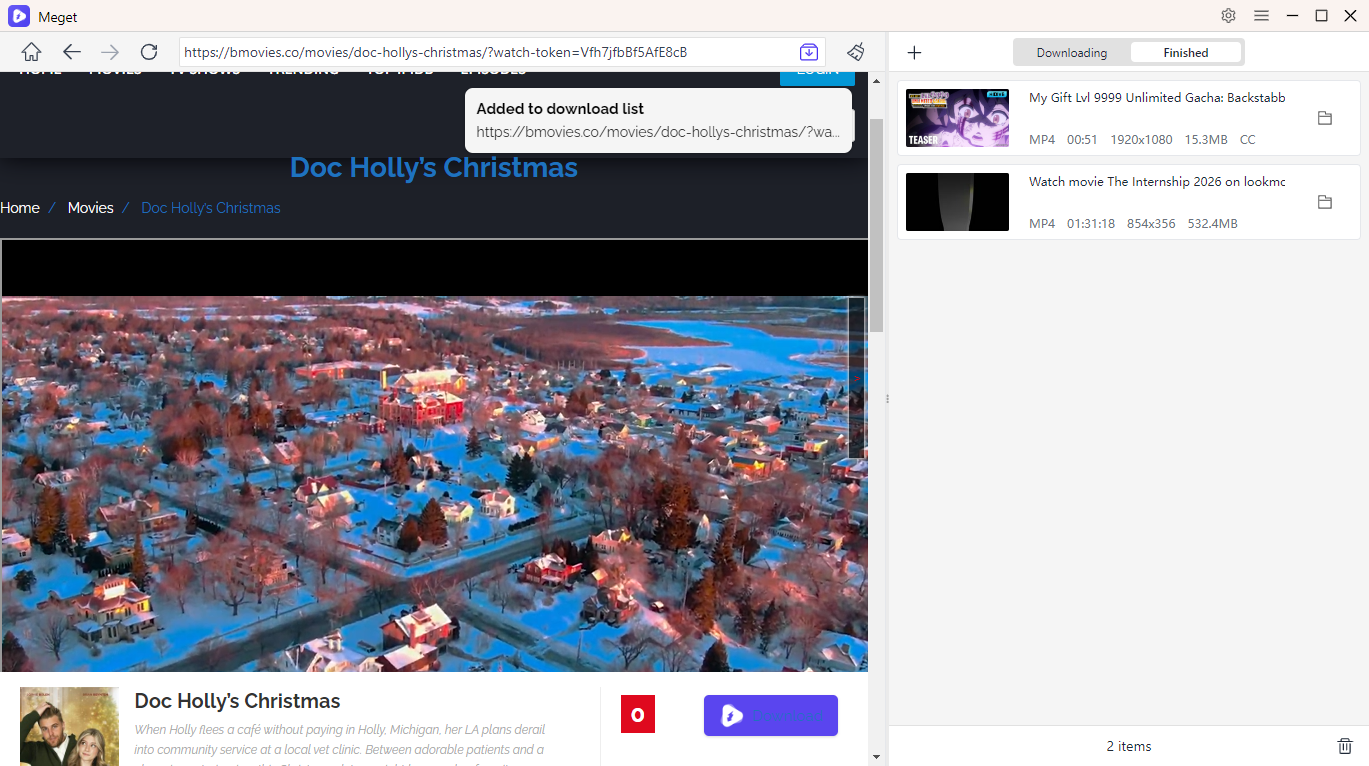
Steps to Bulk Download BMovies with Meget:
- Download and install Meget on your computer, then launch the software to choose video quality and output format
- With the built-in browser, visit the BMovies website and find the movie or episode you want to download.
- Play the video and click the download button to add it to Meget’s download queue.
- Meget will start bulk downloading, and you can access completed videos in the “Finished” folder when done.
4. Conclusion
There are several ways to download videos from BMovies, each suited to different needs. OBS Studio is a solid free option for recording single videos, while browser extensions offer quick downloads for casual users. However, these methods come with limitations such as real-time recording, unstable detection, or lack of batch support.
For users who want speed, efficiency, and high-quality results—especially when downloading multiple movies or entire TV series – Meget is the best solution. Its bulk downloading capabilities and superior video quality make it the most reliable and professional tool for downloading from BMovies.
If you’re serious about offline viewing or building a personal movie library, Meget is the recommended choice for downloading BMovies content safely, efficiently, and at scale.