How to Fix 4K Downloader Only Doing 10 Seconds?

Downloading an online video should be as easy as copying a link and clicking a button. However, some users may find that 4K Downloader only downloads around 10 seconds of a video instead of the complete content. This can be especially frustrating when the original video plays normally in a browser but the saved file stops almost immediately.
In this guide, we’ll explain the main reasons why 4K Downloader may only download 10 seconds, show you how to fix the problem, and introduce an alternative worth trying when 4K Downloader doesn’t work properly.
1. Why Is 4K Downloader Only Doing 10 Seconds?
There isn’t always one specific reason why a download stops at 10 seconds. Common causes include:
- Outdated software: An older version may not work correctly with recent changes to supported websites.
- Website updates: Changes to a website’s video player, streaming technology, or access system can affect third-party downloaders.
- Restricted videos: Private, members-only, age-restricted, or otherwise protected content may not be fully accessible.
- Incorrect download settings: Certain formats, resolutions, or processing options may cause incomplete downloads.
- Unstable internet connection: Connection interruptions can prevent the complete media stream from being retrieved.
- Temporary server problems: The source website may experience technical issues that interfere with downloading.
- Video-specific compatibility: A particular video may use a format or delivery method that 4K Downloader doesn’t handle correctly.
- Insufficient storage: A lack of available disk space can interrupt the download or processing stage.
Identifying which situation you’re dealing with can make troubleshooting much easier.
2. How to Fix 4K Downloader Only Doing 10 Seconds?
Try the following solutions in order. After each method, download a short test video to see whether the problem has been resolved.
2.1 Update 4K Downloader
First, check whether you’re using the latest version of 4K Downloader. Developers regularly release updates to improve compatibility and fix bugs.
Install any available update, restart the application, and try downloading the video again. An outdated version may struggle when a supported website changes its video delivery system.
2.2 Check Whether the Original Video Works
Open the video in your regular browser and play it from beginning to end. Make sure the video isn’t private, unavailable, restricted, or limited to certain users or regions.
If the video itself cannot be played normally, the downloader may not be able to retrieve the full version either.
2.3 Copy the URL Again
A simple URL issue can sometimes cause unexpected download results. Return to the video’s original page, copy its URL again, and paste the new link into 4K Downloader.
Make sure you’re copying the actual video page rather than an embedded player address or an incomplete link.
2.4 Try a Different Video
Test another video from the same website. This helps determine whether the issue is specific to one video.
If other videos download normally, the original video may use a format or access method that isn’t fully supported. If every video stops at approximately 10 seconds, the problem is more likely related to the software, website compatibility, or your connection.
2.5 Change the Download Format or Quality
Try selecting another available resolution or output format. For example, if you’re downloading a high-resolution version, test a lower resolution first.
You can also try another supported output format. This is useful for determining whether the problem occurs during the media-processing stage rather than during the initial download.
2.6 Restart 4K Downloader
Close the application completely and reopen it. If a previous download ended prematurely, remove the incomplete file before starting again.
A fresh download can sometimes resolve temporary application errors that caused the original process to stop.
2.7 Check Your Internet Connection
A weak or unstable internet connection can interrupt video downloads, so restart your router, switch to a more reliable network, or pause other bandwidth-heavy activities if necessary.
After confirming that your connection is stable, retry the download.
2.8 Check Your Storage Space
Make sure your computer has enough free storage for the video. High-resolution videos can require significantly more space than expected, particularly when temporary files are created during processing.
If your storage is nearly full, free up some space or choose another download location.
2.9 Try Again Later
If the issue appears suddenly and affects only certain videos, it may be a temporary problem on the source website. Wait for some time and try again.
3. Try Meget as a Reliable Alternative to 4K Downloader
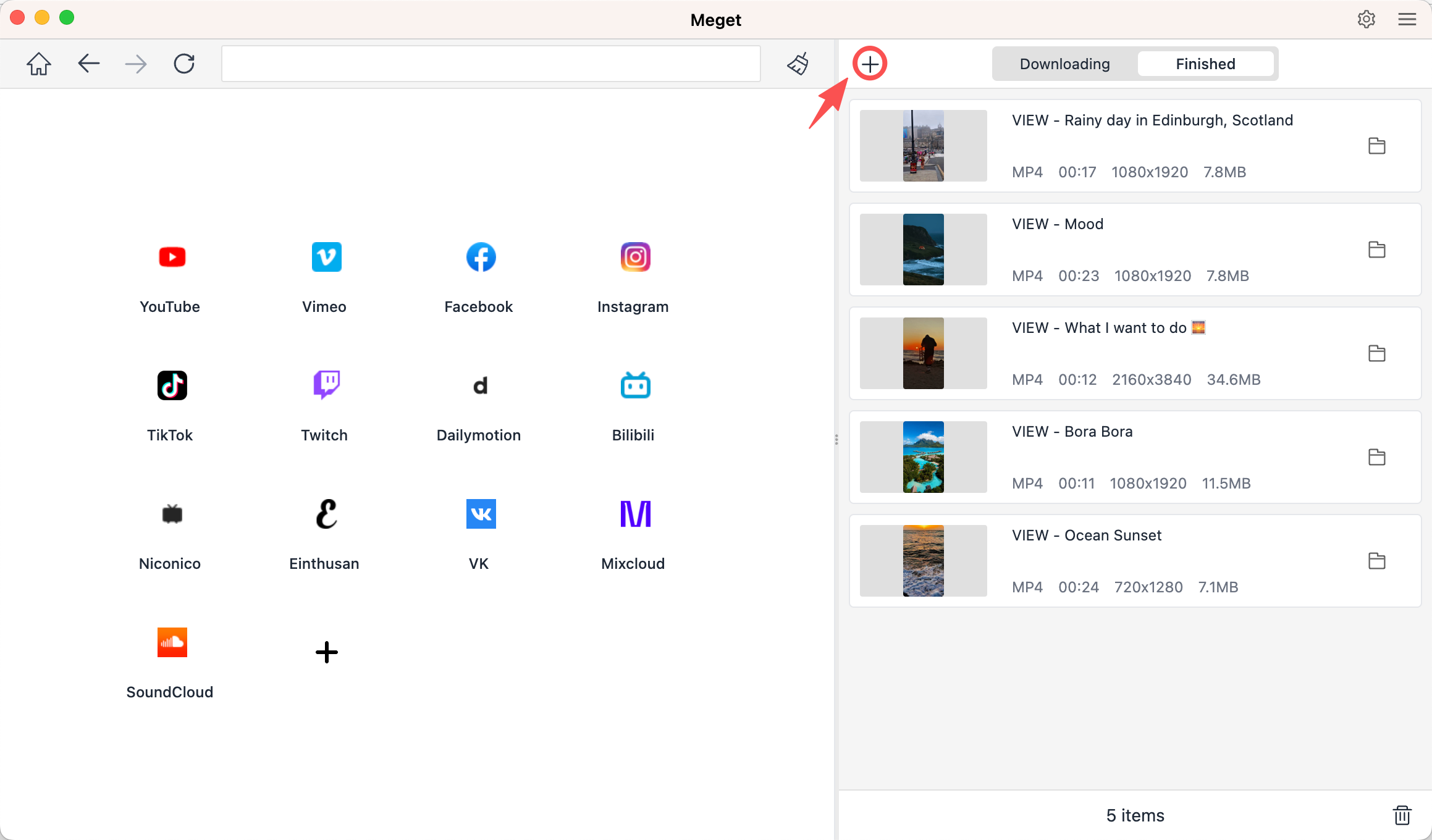
If 4K Downloader keeps saving only 10 seconds of a video even after you’ve tried the usual fixes, switching to another downloader can be a much easier solution. Meget is a powerful alternative that combines video downloading and conversion features in a simple desktop application. It supports videos from more than 10,000 sites and can process individual videos as well as playlists in multiple formats and resolutions.
How to use Meget:
- Download and install the appropriate version for Windows or macOS, then launch the application.
- Choose your preferred format, resolution, subtitle settings, and output folder before starting the download.
- Open the videos you want to save, copy their URLs, and return to Meget.
- Click the option to paste URLs into Meget. The application will analyze the link and start the bulk download process.
4. Conclusion
When 4K Downloader only downloads 10 seconds, the problem can be caused by anything from an outdated application and website changes to restricted content, unstable connections, or incompatible video formats. Fortunately, simple fixes such as updating the software, copying the URL again, changing the output settings, checking your connection, and testing another video can often help.
If none of these solutions works, switching downloaders may be the better option. Meget is a strong alternative to 4K Downloader, offering a simple interface, batch downloading, multiple output options, quality selection, and playlist support. Instead of repeatedly trying to fix a 10-second download, give Meget a try and see whether it can provide a smoother and more reliable downloading experience for your needs.
- How to Fix 4K Video Downloader Error Code 152-18?
- Best Video Downloader CocoCut Alternatives That You Should Try
- How to Download from Movies2Watch?
- GenYouTube Overview: A Complete Guide to Its Features and Usage
- Tuberipper Review: Is It Worth Using?
- How to Fix 4K Video Downloader Can't Find Valid Format?
- How to Fix 4K Video Downloader Error Code 152-18?
- Best Video Downloader CocoCut Alternatives That You Should Try
- How to Download from Movies2Watch?
- GenYouTube Overview: A Complete Guide to Its Features and Usage
- Tuberipper Review: Is It Worth Using?
- How to Fix 4K Video Downloader Can't Find Valid Format?