How to Download Videos from Listal?

Listal is a popular online community where users can discover, organize, and share information about movies, TV shows, celebrities, models, games, and books. Besides detailed lists and user-generated content, many Listal pages also feature embedded videos, trailers, interviews, and clips that fans may want to save for offline viewing. However, Listal does not provide a built-in option to download these videos, leaving users to look for alternative solutions.
Whether you want to archive celebrity interviews, save movie trailers, or back up your favorite media collections, there are several ways to download videos from Listal. In this guide, we’ll explain what Listal is, show you how to download videos from the website, and introduce an advanced solution for downloading multiple Listal videos and images in bulk.
What Is Listal?
Listal is a social cataloging website that helps users create and manage collections of entertainment-related content. Users can explore millions of entries featuring celebrities, movies, TV shows, music, books, and games, while engaging with the community through ratings, reviews, comments, and personalized lists.
Some of Listal’s most popular features include:
- Extensive celebrity and entertainment databases
- User-created lists and collections
- Movie trailers and promotional videos
- Celebrity interviews and event clips
- High-quality photos and image galleries
- Community ratings and recommendations
Many videos displayed on Listal are embedded from third-party platforms, while others are hosted directly through supported media services. As Listal does not support direct video downloads, users typically use browser-based solutions or dedicated downloading software to save their favorite videos.
How to Download Videos from Listal
There are several methods for downloading videos from Listal. The right option depends on whether you need a single video or multiple files.
Method 1: Use an Online Video Downloader
If the video has a publicly accessible URL, some online downloaders may detect it automatically.
Steps:
- Copy the URL of the Listal page that contains the video you want to download.
- Launch an online downloader like TubeNinja, paste the Listal page URL into the input box, then click Download to analyze the page.
- Choose the available video quality and save the video to your device.

This method is quick but may have limitations.
Pros:
- Simple to use
- No installation required
Cons:
- Many sites cannot detect embedded Listal videos.
- Free services often have ads or download restrictions.
- Batch downloading is rarely supported.
Method 2: Use a Browser Extension
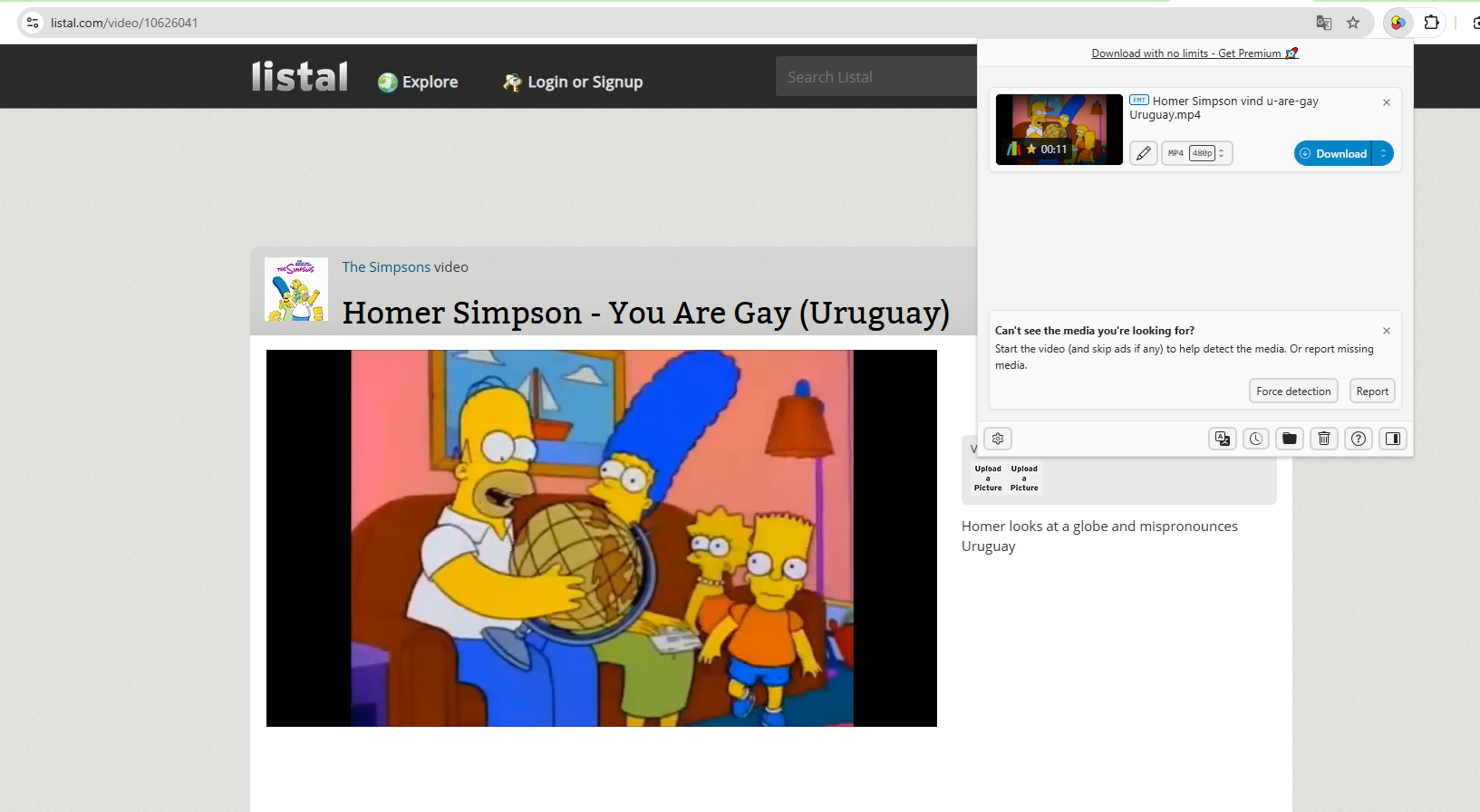
Video downloader extensions for Chrome or Firefox can sometimes detect media files playing on Listal pages.
Steps:
- Add a reputable video downloader extension, such as Video DownloadHelper, to your browser.
- Open the desired Listal page, play the video and click the extension icon.
- Select the detected Listal video and download the file.
Pros:
- Easy to install and use
- Convenient for downloading individual videos
- Allows downloads without leaving your browser
Cons:
- May not detect embedded or protected videos
- Browser updates can cause extensions to stop working
- Most extensions don’t support batch downloads
- Some extensions have ads, usage limits, or privacy concerns
3. Advanced Bulk Download Listal Videos & Images with Meget Pro
If you frequently download content from Listal, manually saving videos one by one can quickly become time-consuming. A dedicated downloader like Meget Pro offers a much faster and more reliable solution.
Meget Pro is a desktop media downloader designed for downloading videos and images from numerous websites. It can detect media automatically, supports batch downloads, preserves original quality whenever available, and simplifies downloading entire collections instead of individual files.
Key Features of Meget Pro:
- Download multiple Listal videos and images in batches.
- Browse embedded and private Listal content with the built-in browser.
- Save videos and images in their original quality.
- Filter Listal images by size and file type before downloading.
- Export videos and images in popular formats such as MP4, MP3, PNG, or their original formats.
How to Download Listal Videos and Images with Meget Pro:
Step 1. Download and install Meget Pro on your Windows or Mac computer.
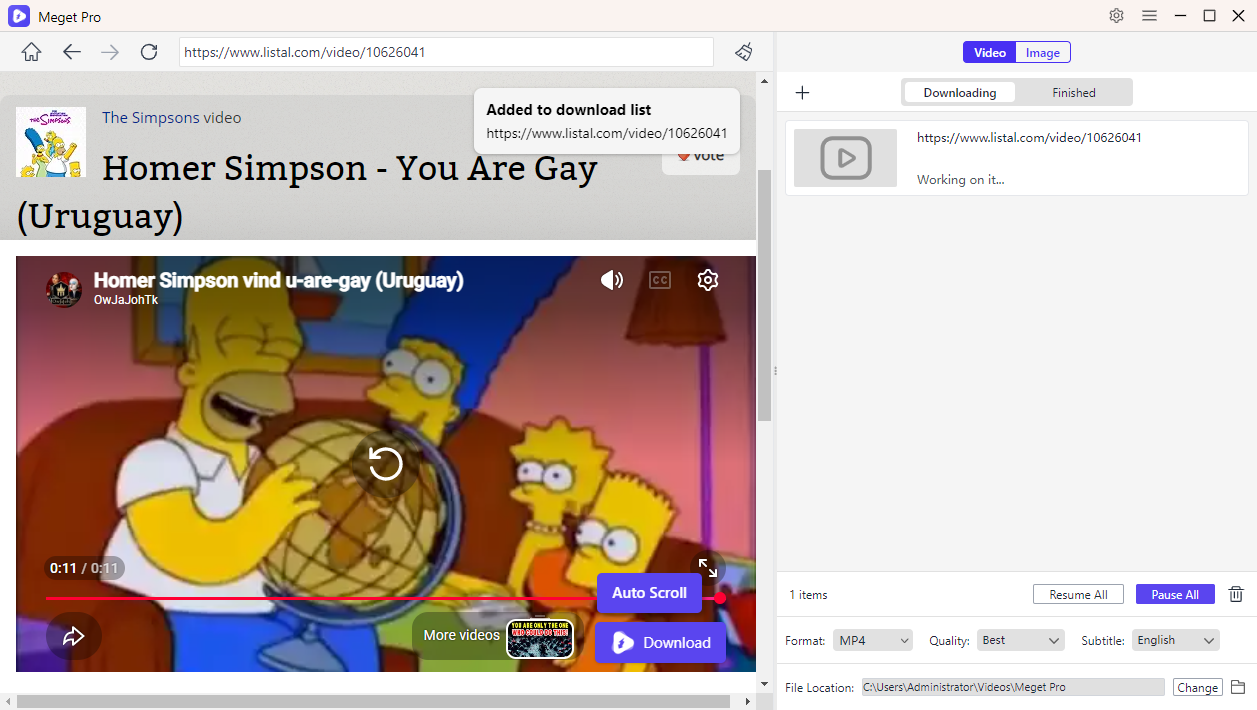
Step 2. To download Listal videos, open Meget Pro and browse to the Listal page containing the videos or images you want to download; Play the video and configure your preferred download settings, then the Download button to add the video to the download list.
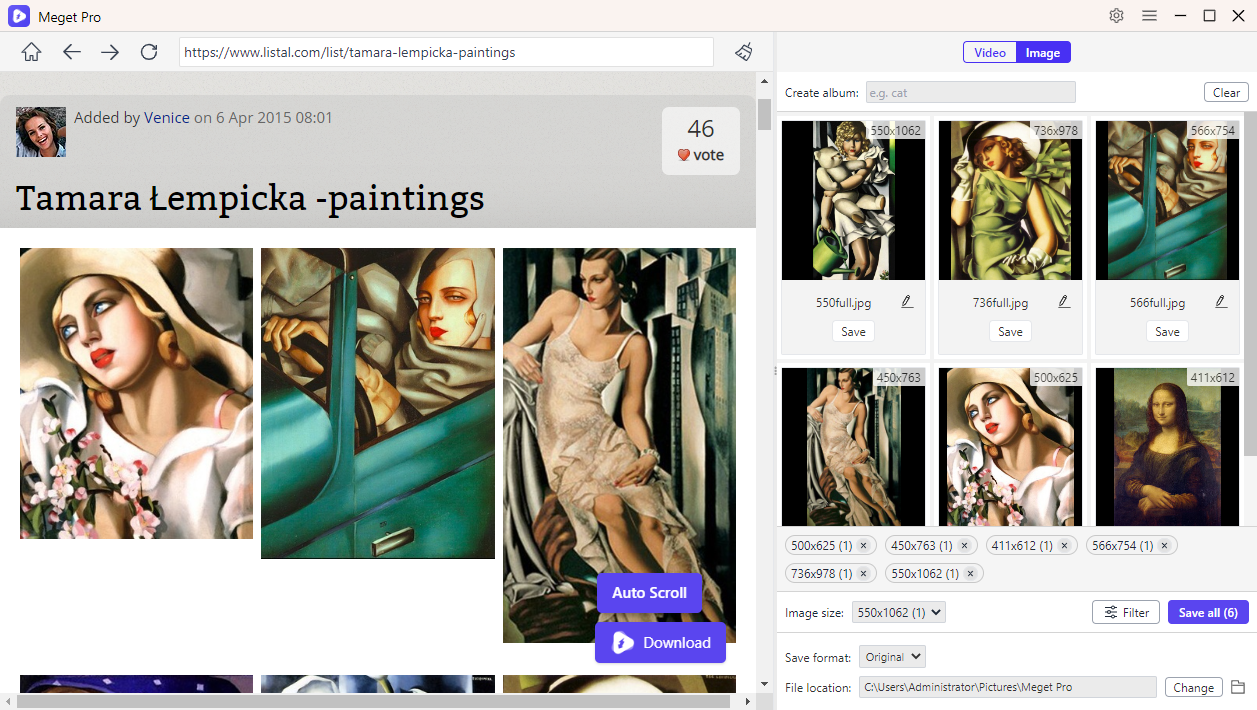
Step 3. To download Listal images, scroll the Listal page to extract all available images, then you can filter desired images and download them with one click.
4. Conclusion
Although Listal doesn’t include an official download option, you can still save videos using online downloaders, or browser extensions. These methods work reasonably well for occasional downloads, but they often become inconvenient when downloading multiple videos or entire media collections.
If you need a faster and more reliable solution, Meget Pro is an excellent choice. Featuring automatic media detection, bulk downloading, original-quality preservation, and a built-in browser, Meget Pro streamlines the process of saving Listal videos and images. Whether you’re archiving movie trailers, celebrity interviews, or image galleries, Meget Pro offers the most efficient way to download and organize your favorite Listal media.
- Is SavePanda Worth It? A Detailed Review for 2026
- yt-dlp Download Audio Only Worst Audio? Fix It With These Solutions
- Do DRM Video Downloader Extensions Really Work? Try These Alternative Tools
- How to Fix 4K Video Downloader Error Code 152-18?
- Best Video Downloader CocoCut Alternatives That You Should Try
- How to Download from Movies2Watch?
- Is SavePanda Worth It? A Detailed Review for 2026
- yt-dlp Download Audio Only Worst Audio? Fix It With These Solutions
- Do DRM Video Downloader Extensions Really Work? Try These Alternative Tools
- How to Fix 4K Video Downloader Error Code 152-18?
- Best Video Downloader CocoCut Alternatives That You Should Try
- How to Download from Movies2Watch?
- GenYouTube Overview: A Complete Guide to Its Features and Usage